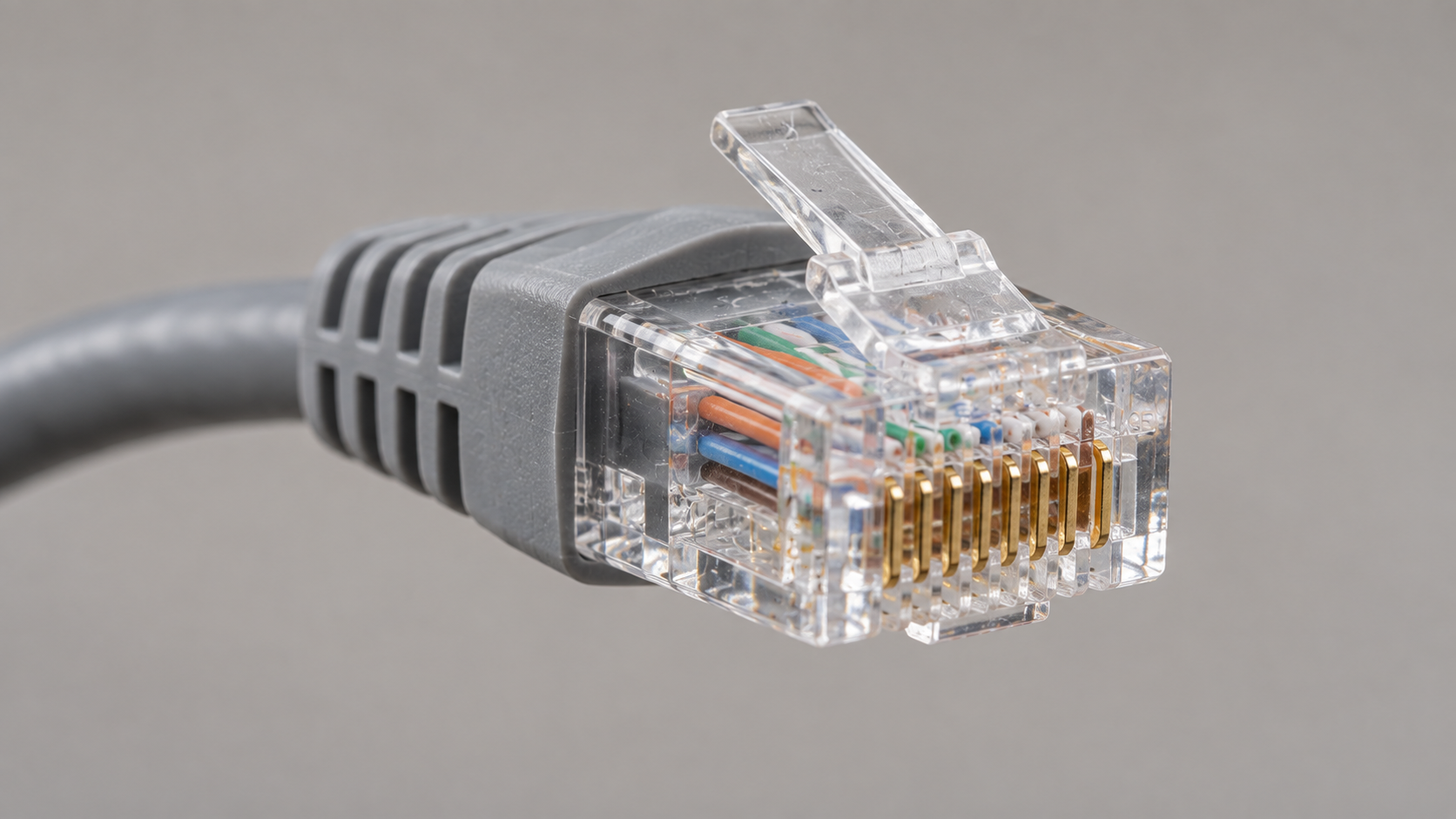
An Ethernet cable ends in a wide, rectangular, semi-transparent plug with eight small metal contacts inside and a plastic clip on top that clicks when you push it into a port. The cable itself is usually round, noticeably thicker than a phone cord, and has text printed along its outer jacket. Once you know what the plug looks like, identification takes about three seconds — and this guide covers that check, the cables people confuse it with, what the printing on the jacket tells you, and where the matching port sits on your devices.
The Fastest Way to Identify an Ethernet Cable
Ignore the color, ignore the length, ignore how it feels. One look at the connector settles it, and everything else is secondary detail.
The RJ45 Connector: Eight Contacts and a Clip
The plug on each end is called an RJ45. It is a rectangular block of clear or lightly tinted plastic, roughly the width of a pencil eraser, with eight thin gold-colored contacts visible through the front face in a single row. On the top there is a small springy tab — the locking clip — that you press to release the cable from a port. If you can see eight contacts side by side behind clear plastic, it is Ethernet.
The Cable Itself: Thickness, Shape and Jacket
Most Ethernet cable is round, between four and seven millimetres thick, and stiffer than a phone cord or a USB cable of the same length. The jacket is a solid color — grey, blue, black, white and yellow are the common ones — with small text printed along it repeating every foot or so. That printed text is the second-best identification clue after the plug, and the section below explains how to read it.
A Three-Second Check
Hold the end toward the light and count the contacts. Eight in a row, in a plug about a centimetre wide, with a clip on top means Ethernet. Four or six contacts in a narrower plug means a telephone cable. Anything flat, oval, or metal-shelled — USB, HDMI, DisplayPort — is something else entirely.
Ethernet Cable vs Phone Cable and Other Lookalikes
Only one cable is genuinely easy to mistake for Ethernet, and it is the one that used to be in every house.
RJ45 vs RJ11: Width and Contact Count
A telephone cable ends in an RJ11 plug, which is the same shape and the same clear plastic but visibly narrower — about two-thirds the width — with four or six contacts instead of eight. Put the two side by side and the difference is obvious. With only one in your hand, count the contacts: more than six means Ethernet. The two connectors are not interchangeable in either direction.
What Happens If You Force the Wrong Plug
An RJ11 plug will slide into an Ethernet port because the port is wider, and it will sit there loose without making a connection, which is why people conclude the port is broken. It also risks bending the contacts inside the port, since the narrow plug can press on the wrong pins. If a plug rattles in the socket instead of clicking home, stop and check the plug width rather than pushing harder. An RJ45 will not fit into a telephone jack at all.
Other Cables People Confuse It With
Coaxial cable, used for cable television and older analog cameras, has a single threaded metal barrel with a pin in the centre — nothing like an RJ45. Fiber optic patch cables are much thinner, often yellow or aqua, and end in small square or round ferrules with no visible metal contacts. Older serial and telephone extension leads with modular plugs are all narrower than RJ45.
What Is Inside an Ethernet Cable?
Cut one open and the interior is the same across every category: eight copper conductors, arranged as four pairs, each pair twisted around itself along the whole length.
Four Twisted Pairs
Each pair is color-coded — typically blue, orange, green and brown, each paired with a mostly-white version of the same color — and those colors are visible through the transparent plug if you look closely at the connector. The twisting is not decorative: two wires twisted together cancel out much of the electrical interference they pick up, and that is what allows the cable to carry high-speed data without errors. Tighter twists in higher categories are part of why those cables perform better.
Shielded and Unshielded: How to Tell by Looking
Unshielded cable has the four pairs sitting directly inside the jacket. Shielded cable adds a layer of foil or braided mesh around the pairs, or around each pair individually, to block interference. From the outside, shielded cable is thicker and noticeably stiffer, and the connector often has a metal casing rather than plain plastic. That metal shell on the plug is the quickest visual sign that a cable is shielded.
How to Read the Printing on the Jacket
Nearly every Ethernet cable has its specification printed along the outer jacket in small type, repeated at regular intervals. It is the only reliable way to know what you are holding.
Finding the Category: Cat5e, Cat6, Cat6a
Look for a string that starts with “Cat” or “Category” followed by a number: Cat5e, Cat6, Cat6a, Cat7 or Cat8. That is the performance rating, and it is what determines the maximum speed the cable supports. Run the cable through your fingers and rotate it while looking — the text faces one direction, so it may be on the side away from you. If you cannot find it near the end, keep going; the printing repeats along the length.
What UTP, STP and AWG Mean on the Label
A typical line reads something like “Cat6 UTP 23AWG 550MHz”. UTP means unshielded twisted pair and STP means shielded twisted pair. AWG is the wire gauge, where a lower number is a thicker conductor — 23AWG is thicker than 24AWG, and thicker conductors hold up better over long runs. The MHz figure is the bandwidth the cable is rated for. There is often also a certification mark such as UL or a TIA reference.
If the Printing Is Worn Off
On old or heavily handled cable the text rubs away. In that case the physical clues are all you have: thinner and very flexible usually means Cat5 or early Cat5e, while thicker and stiffer suggests Cat6 or above. It is an estimate, not a reading. If a cable is more than a decade old and unlabeled, treating it as Cat5e is the safe assumption — and if the network runs slower than it should with everything else ruled out, an unidentifiable cable is a reasonable thing to replace.
Where to Find the Ethernet Port on Your Devices
The port is the mirror image of the plug: a rectangular slot, slightly wider than a telephone jack, with a notch at the top for the clip. Most devices have it on the back or the side, usually grouped with other connections.
- Router: several ports in a row, typically labeled LAN or numbered, plus one labeled WAN or Internet in a different color.
- Modem: usually a single port going to the router.
- Network switch: a row of four, eight, sixteen or more identical ports.
- Desktop computer: on the back panel, near the other rear connections.
- Smart TV, streaming box, game console: on the rear panel alongside HDMI.
- IP camera, access point, intercom panel: often a single port that carries both data and power.
- Laptop: many thin laptops have no port at all and need a USB or dock adapter.
Most ports have one or two small LEDs beside them. A steady light generally means a live connection and a flickering one means data is moving. No light at all when a cable is plugged in and both devices are on usually points at the cable, the termination, or the port itself.
What Ethernet Looks Like Inside the Walls
What you see in a finished home or office is only the ends of the system. The rest is hidden, and it looks quite different.
At the room end there is a wall plate with one or more RJ45 sockets set into it, sometimes labeled with a room or port number. A short patch cable runs from that socket to the device. Behind the plate, a single continuous run of cable — thicker and stiffer than a patch cord, with solid rather than stranded conductors — travels through the wall or ceiling to a central point. There it terminates on a patch panel: a horizontal strip of numbered sockets mounted in a cabinet, with short patch cables connecting each one to a switch.
In New York’s older buildings there is usually no such wiring to begin with. Pre-war walls have no accessible cavities and no conduit to reuse, so cable is typically routed through existing risers, along baseboards in surface trunking, or through closets between floors rather than concealed in the walls. Our guides on running Ethernet cable through a house and on structured cabling cover how those runs are planned and terminated.
Flat, Round, Coiled and Outdoor Cables
Not every Ethernet cable is a standard grey round patch cord. Flat cables are ribbon-shaped and a few millimetres thick, made to run under carpet or along a skirting board; they work fine over short distances but are more fragile. Coiled cables stretch like an old telephone handset cord and are used where a device moves. Outdoor and direct-burial cable has a thick UV-resistant black jacket and sometimes a gel filling, making it noticeably heavier and stiffer. Plenum-rated cable, used in air-handling spaces in commercial buildings, looks ordinary but has a jacket made from low-smoke material and is marked CMP on the print. All of them terminate in the same RJ45 plug.
Frequently Asked Questions
What does an Ethernet cable look like?
It is a round cable, thicker than a phone cord, ending in a wide rectangular clear plastic plug with eight metal contacts in a row and a small locking clip on top. Text printed along the jacket gives its category.
How is an Ethernet cable different from a phone cable?
The plug. An Ethernet cable uses an RJ45 connector with eight contacts; a phone cable uses a narrower RJ11 with four or six. The Ethernet plug is roughly a third wider and will not fit a telephone jack.
Do all Ethernet cables look the same?
The connector is the same on all of them, but the cable varies. Shielded cable is thicker with a metal-cased plug, flat cable is ribbon-shaped, and outdoor cable has a heavy black jacket. Higher categories tend to be thicker and stiffer.
Does the color of an Ethernet cable mean anything?
Not in terms of performance. Color is used for organization, and installers often follow their own conventions to tell one type of connection from another. A blue cable and a yellow cable of the same category perform identically.
How do I tell what category my Ethernet cable is?
Read the small print along the jacket and look for “Cat” followed by a number. The text repeats along the length, so check further down if the end is worn. Without printing, thickness and stiffness are only a rough guide.
What does an Ethernet port look like?
A rectangular slot with a notch at the top for the plug’s clip, wider than a telephone socket, usually with one or two small status LEDs beside it. On a router there are several in a row.
When You Need Ethernet Run Properly
Identifying a cable is easy; getting one to deliver its rated speed once it is inside a wall is not. Category, run length, termination quality and routing away from electrical lines all decide whether a Cat6 run actually performs like Cat6, and poor terminations are the usual reason a network runs slower than its cable is rated for. For homes and offices in New York City, professional Ethernet cabling installation covers the design, routing, termination and testing. Where running cable is impractical — a landmarked building, a short-term lease, a finished space nobody wants opened up — a properly designed wireless network is often the better answer than a compromised wired one.
If you want the background on what the cable does rather than what it looks like, our guide to what an Ethernet cable is covers categories, speeds and distance limits in detail.